TokenTrend
- By
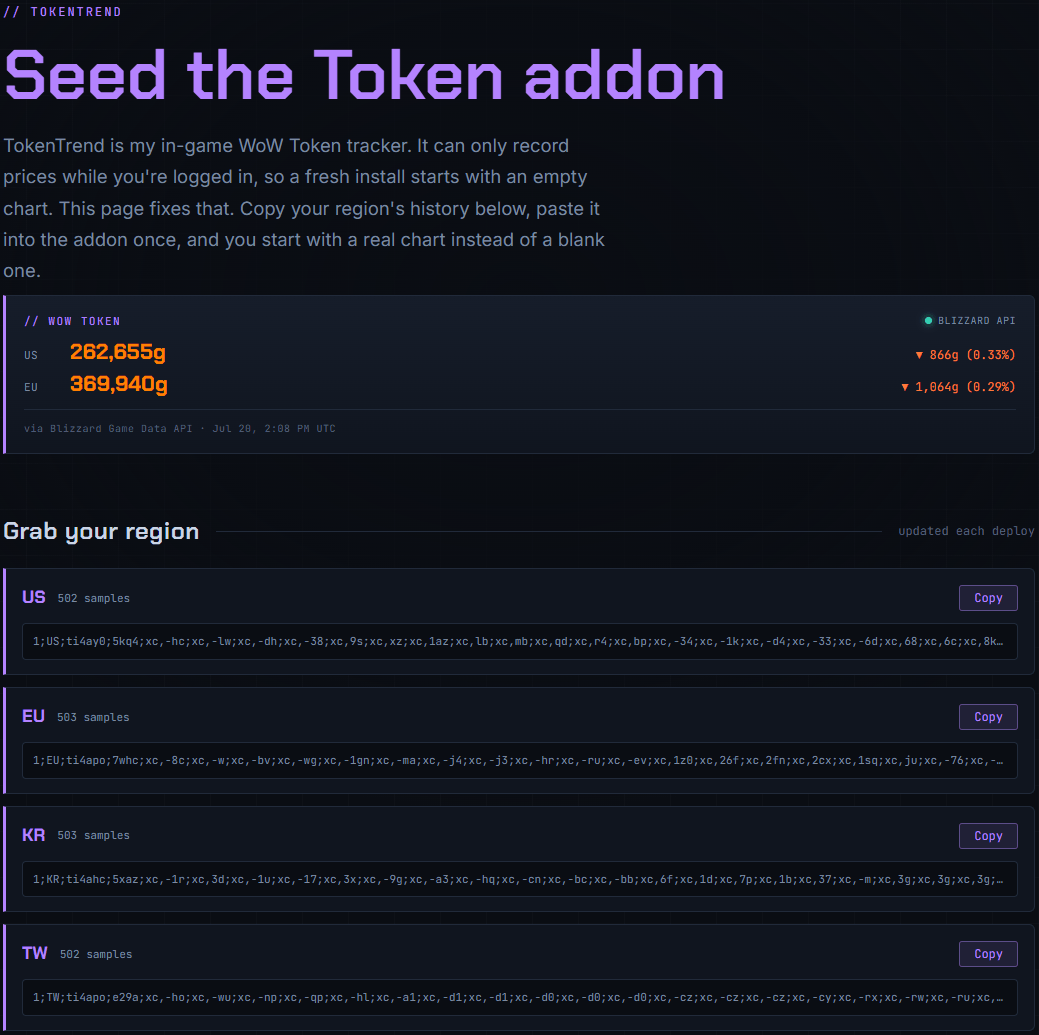
A financial-terminal for the WoW Token — chart the price, read the trend, and time your buys like a market. Visit kkthnx.com/wow/token to import samples from live tracking! You only need to do this once!
Screenshot_7.png
Screenshot_10.png
Screenshot_9.png
Screenshot_8.png
Screenshot_10.png
Description
TokenTrend
A price terminal for the WoW Token. Chart the price, read the trend, and time your buys like a market.
Everything you'd want to know about one number. What the token costs in your region right now, and where it's been.
What it does
TokenTrend turns the WoW Token price into a proper chart. It quietly records the price while you play, saves the history, and draws it as line charts, candlesticks, moving averages, and heatmaps. So "is now a good time to buy?" becomes something you can see at a glance instead of guess.
Here's the catch that every price addon has. Addons only run while you're logged in, so TokenTrend can't see the past on its own. It builds your history one reading at a time. But you don't have to start from an empty chart. You can seed it with real history from my website in about ten seconds, and it'll keep filling in from there. More on that right below.
A few things that make it worth using:
- Real charts, not a toy. Candlesticks, moving averages, an OHLC table, and buy and sell signals, all from live data.
- Region-aware. The token economy is region-wide, so your history is shared across all your characters on the same region.
- Light on your game. It samples on events, caches its math, and reuses textures, so it stays cheap even with a long history.
- Midnight-ready. Every price read is guarded so nothing errors out in combat.
Install
- Download the latest release and drop the
TokenTrendfolder intoWorld of Warcraft\_retail_\Interface\AddOns. - Restart the game, or type
/reloadif you're already in. - Open it with
/tt. The first price shows up within a few seconds.
There's nothing to set up. TokenTrend starts recording the moment it loads.
Start with a full chart
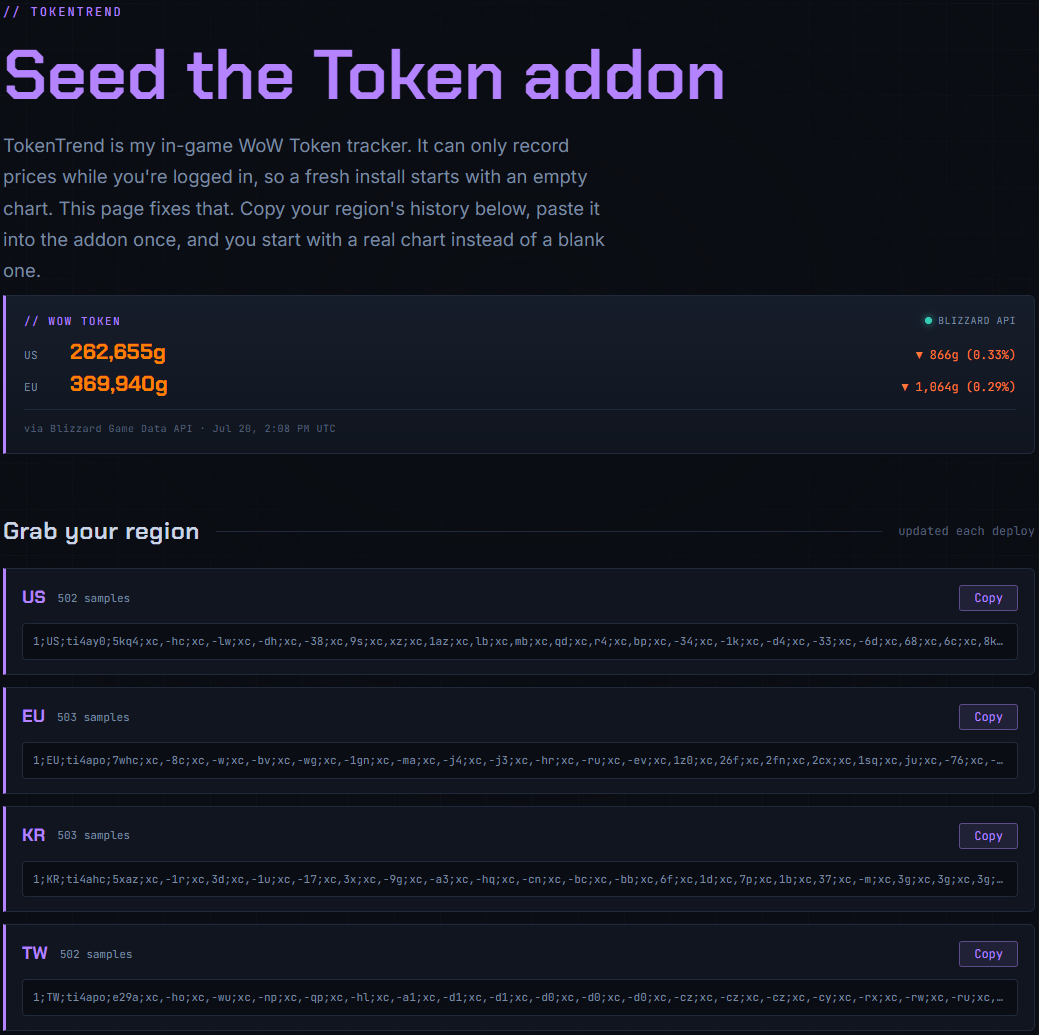
A fresh install has no history yet, so the chart opens empty. You don't have to wait weeks to fill it. You can seed it with real, recent prices from my site in about ten seconds.
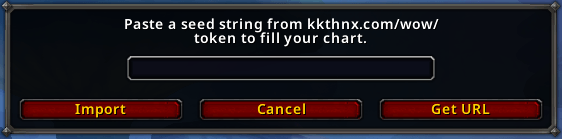
- In-game, open TokenTrend with
/ttand click Import in the footer. Or type/tt import. - Don't have the string yet? Click Get URL in that window, or type
/tt url. It hands you the web address to copy. - Open kkthnx.com/wow/token in your browser and hit Copy next to your region (US, EU, KR, or TW).
- Back in-game, paste the string into the Import box and confirm.
Your chart fills in right away. These are real prices pulled from Blizzard's official data, not made-up filler. The import only adds to empty spots, so it never overwrites anything you've recorded yourself, and you can run it more than once safely. From there, TokenTrend records the live price on its own.
Why copy and paste instead of a download button? Addons can't reach the internet. My website can see recorded history that the addon can't, so handing it over as a short string you paste in is the cleanest way to bridge the two.
Commands
| Command | What it does |
|---|---|
/tt or /tokentrend |
Open or close the window |
/tt show |
Open the window |
/tt hide |
Close the window |
/tt theme |
Cycle the color theme |
/tt refresh |
Ask the server for a fresh price |
/tt import |
Open the Import window to paste history from the site |
/tt url |
Show the seed page address to copy into your browser |
/tt sync |
Toggle sharing history with your guild and group |
/tt clock |
Switch between 12 and 24-hour time |
You can also left-click the minimap button to open the window, and drag it around the minimap ring to move it.
What's inside
Live price
The header shows the current price with an up or down arrow for the day's move, colored green, red, or neutral. Under it, a Day Range bar shows where today's price sits between its own low and high.
Charts
The line chart plots the price with optional 7-day and 30-day moving averages, so you can see at a glance whether the current price is above or below its normal range. Switch to candlesticks to group readings into hourly or daily open, high, low, and close candles. Green candles are up, red are down.
Move your mouse across the chart and a crosshair snaps to the nearest reading. In line mode it shows the date and price. In candle mode it shows the full open, high, low, and close. You can view the last 7, 30, or 90 days, or all of it.
Signals and timing
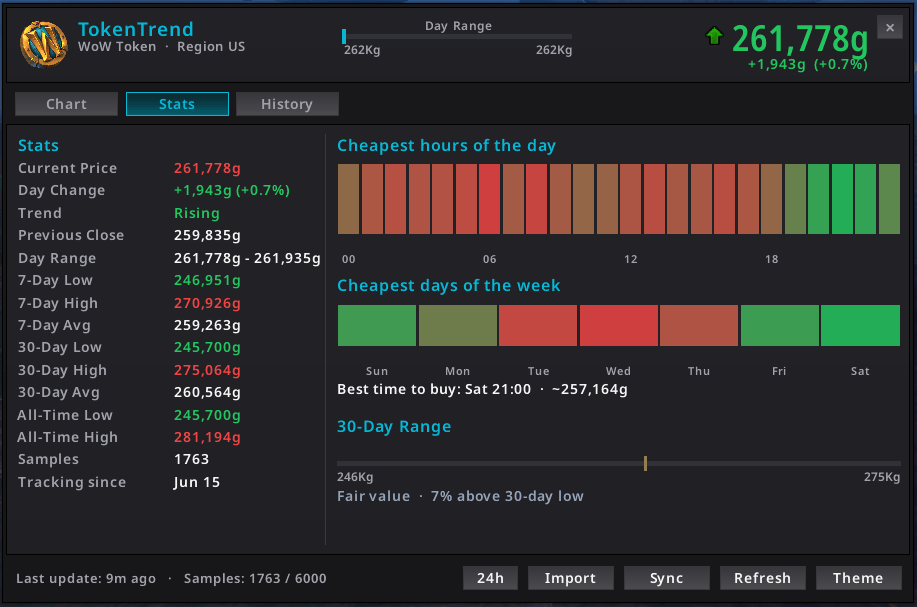
A green buy banner fires when the price hits a 30-day low, or gets within one percent of it. There are also heatmaps showing which hours of the day and which days of the week have historically been the cheapest, with a "best time to buy" line that reads the answer off the data for you. A 30-day range gauge tags the current price as Cheap, Fair value, or Expensive.
Stats and history
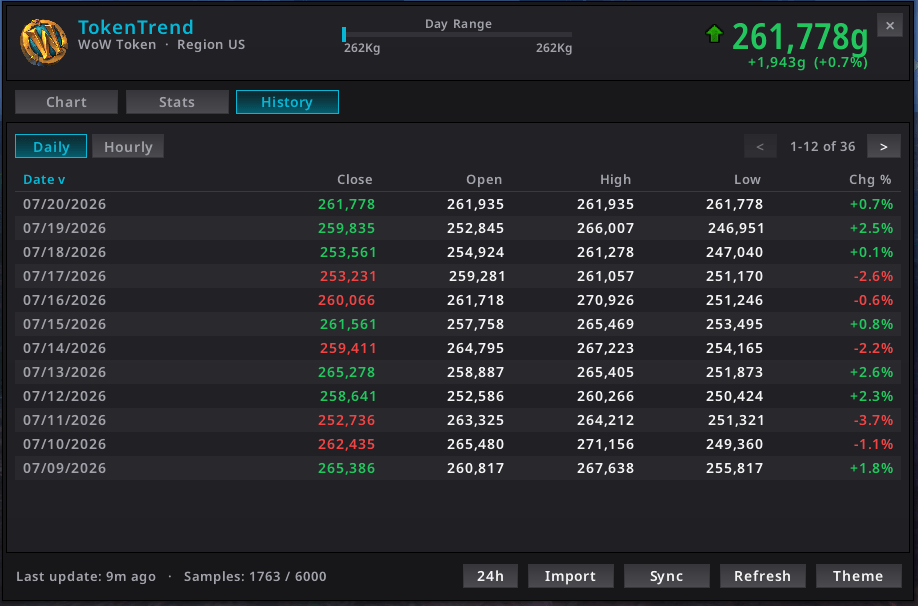
The Stats tab lists previous close, day range, and the low, high, and average for the last 7 days, 30 days, and all time, plus your sample count and when you started tracking. The History tab is a full price table (date, close, open, high, low, and daily percent change), daily or hourly, newest first, like a stock site's history page.
Looks
Two themes ship with it. The Terminal is cyan on charcoal and is the default. Lunar Exchange is blue on silver. Swap between them live with /tt theme, no reload needed. The close button, footer controls, and brand icon all match the active theme. Every time readout follows your 12 or 24-hour preference, which you can flip anytime.
Nice touches
- Seed from the site. Start with a full chart instead of an empty one. See Start with a full chart above.
- Peer sync. Fill your offline gaps by trading price history with guildmates and group members. See Peer sync below.
- Minimap button. Left-click to open, drag to move.
- Small save file. History is saved at most once every 20 minutes and capped per region, so it never bloats your account.
Peer sync
Since the addon only records while you're logged in, every hour you're offline is a gap in your chart. Peer sync fills those gaps by swapping price history with other TokenTrend users. So your charts and heatmaps get rich from real play instead of weeks of solo collecting.
One thing it does not do is change today's price. The current price is a server value, the same for everyone in your region. Sync only fills in the history behind that number. It never touches the live price.
Who you sync with
You sync with your guild and your party or raid. WoW has no global addon channel, so it only reaches people you're actually grouped or guilded with. It's also region-locked, since the token economy is per region, so data from another region gets dropped. Sync is on by default and you can toggle it anytime with /tt sync or the panel's own button.
How it works
Each copy of the addon shares a small summary of which days it has data for. Another copy compares that to what it has, asks only for the days it's missing, and gets just those back. It all runs through a throttled queue that's safe to interrupt, so a busy guild can't get you booted for chat spam.
Keeping the data clean
Sync is careful about what it trusts:
- It only adds, never overwrites. Incoming data fills empty slots only. Your own readings always win.
- It rejects nonsense. Prices outside a sane range (roughly 1,000 to 100 million gold) are thrown out.
- No future dates. Samples dated in the future are refused.
- Region-locked, with a per-person cap on how much any single peer can hand you.
The sync panel
The footer Sync button opens a small panel that shows your on/off status, how many samples you gained this session, who filled your gaps, and who you helped in return.
Settings
Almost everything is controlled right from the window:
- Theme with
/tt themeor the Theme button. - Chart mode, range, and moving averages with the toggle row above the chart.
- History grouping with the Daily and Hourly toggles on the History tab.
- Peer sync with
/tt sync. - Clock with
/tt clockor the 24h/12h button.
Every change applies live. TokenTrend re-themes and redraws without a reload.
How it works under the hood
For the curious, here's the short version:
- Fetch. It asks the server for a price update and reads the value back when the game fires the update event. A timer keeps a steady heartbeat going.
- Store. Each price gets saved with a timestamp, keyed by region. It saves at most once every 20 minutes and caps at 6,000 points per region to keep the file small.
- Analyze. Moving averages, candles, highs and lows, and the volatility buckets are all worked out on demand and cached, so nothing recalculates until a new price actually lands.
- Render. The line chart uses LibGraph. The candlesticks are drawn from a reused pool of textures.
- Sync and import. Both add price history the same careful, add-only way, so neither one can ever clobber what you've recorded yourself.
A note on Midnight (12.0): money values can be hidden in combat. TokenTrend checks for that before doing any math and just skips that reading rather than erroring, then catches the next clean one.
File layout
TokenTrend/
├── TokenTrend.toc
├── Core/
│   ├── Namespace.lua   # namespace, palettes, tiny event/signal engine
│   ├── Locales/enUS.lua
│   ├── Util.lua        # formatting, secret guards, math, object pool
│   ├── Config.lua      # defaults + SavedVariables init/migration
│   └── Core.lua        # init glue + slash commands
├── Modules/
│   ├── Data.lua        # token polling + history recording + peer merge
│   ├── Analysis.lua    # moving averages, candles, highs/lows, volatility
│   ├── Sync.lua        # peer-to-peer history backfill over addon channels
│   └── Import.lua      # decode + merge a seed string from the website
├── UI/
│   ├── Main.lua        # window chrome, theming, header, tabs, footer
│   ├── SyncPanel.lua   # footer Sync popover (status, gained, peers)
│   ├── ChartHover.lua  # chart crosshair, marker, and hover readout
│   ├── Chart.lua       # line (LibGraph) + candlestick rendering
│   ├── Stats.lua       # metrics + volatility heatmaps
│   ├── History.lua     # paginated OHLC table
│   └── Minimap.lua     # minimap button
└── Libs/
    └── LibGraph-2.0/
Requirements
- World of Warcraft Retail (Midnight, interface
120007). - LibGraph-2.0 is bundled, so there's nothing extra to install.
Credits
TokenTrend leans on the work of others, borrowed with respect:
- Cryect and Xinhuan for LibGraph-2.0, the line-charting engine.
- NASDAQ for the look of the history table, day range bar, and valuation gauges.
- Blizzard for the token API and the UI patterns this is built on.
License
LibGraph-2.0 is © Cryect and Xinhuan, used under its original license. TokenTrend's own code is free to use and modify.
Built for traders, tinkerers, and gold-makers. **GLHF.**
The TokenTrend Team


Owner